Take deposits or full payment
A deposit turns a “hope they show” booking into a committed one. Rezzy collects it at booking time, straight into your own Stripe or Square account. Prefer not to charge anything up front? Require a card on file instead: the booking costs nothing today, and a late cancellation or no-show can cost the fee the client agreed to. Rezzy takes no commission and never holds your money.
What you’ll need
A Stripe or Square account (free to create). Stripe if you’re new to both; Square if it already runs your card reader.
Connect your payment account
- Go to Settings → Payments.
- Click Connect Stripe or Connect Square and approve the connection.
- That’s it. Payouts follow your Stripe or Square schedule, exactly like an in-person charge.
One provider at a time: connect the one that matches where you want the money to land.
Require payment per service
- Go to Settings → Services and open a service.
- Under Require, pick one:
- Nothing, book freely: no payment at booking.
- A card on file to book: no charge today; set the Late fee ($) the client agrees to. Good when you want teeth behind your cancellation policy without charging up front.
- A deposit to book: set the Deposit ($) amount. Good for long or high-demand appointments.
- Full payment to book: the whole price up front. Good for packages and classes.
- Save. The booking page now asks for payment (or a card) before the slot is confirmed.
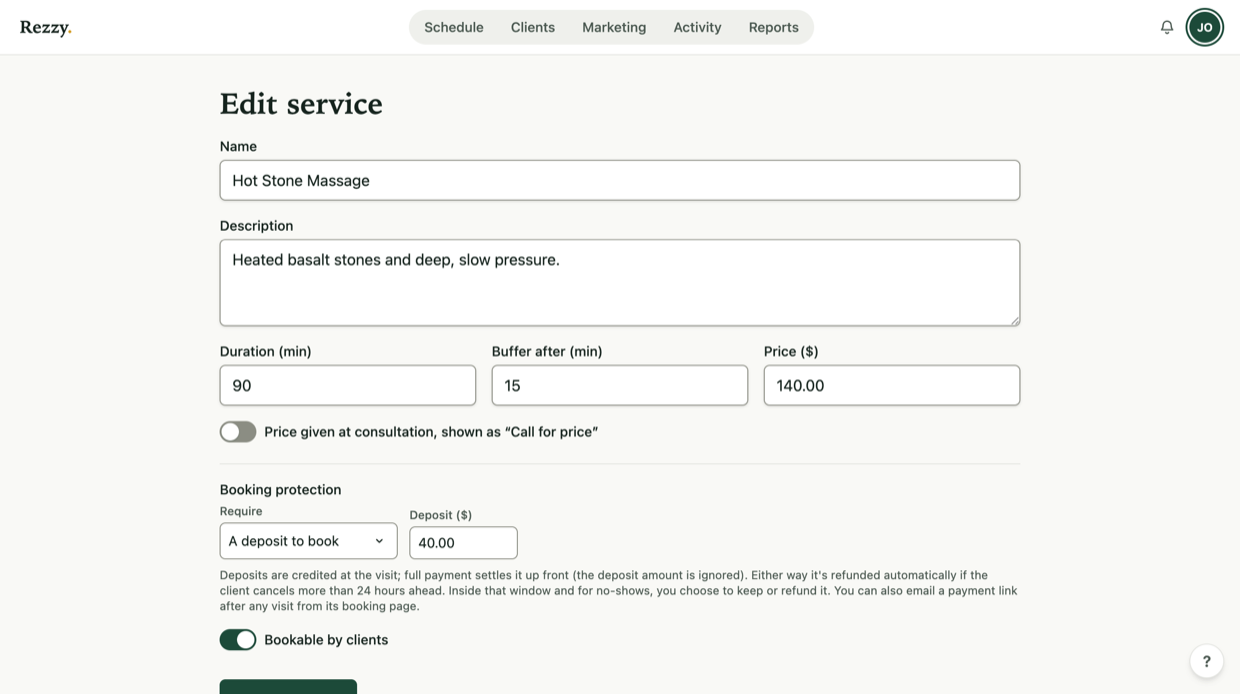
Each service sets its own rule, so a consult can stay free while a full set takes a deposit.
Card on file: teeth without money up front
With A card on file to book, the client enters their details and agrees to your cancellation policy in one checkbox: “Free cancellation until {date}. After that, a {fee} late-cancellation or no-show fee may be charged to your card.” Then they save a card. Nothing is charged at booking, and the same sentence is repeated in their confirmation email and on their manage page.
The card is saved by Stripe or Square on your own account, whichever you connected. Card details go straight to your payment provider and never reach Rezzy, which stores only a reference it can charge later with your say-so.
The fee is never charged automatically. Two moments put the choice in front of you:
- Cancelling inside your cancellation window asks whether to waive the fee (the default) or charge it.
- Marking a no-show puts a Charge the fee button on the booking page, next to Waive.
Either way the client was told the exact fee before they booked, and Rezzy keeps a timestamped record of their agreement. A declined card is simply marked failed so you can retry or follow up in person, and a charged fee can be refunded from the booking page if you relent.
Card on file works on Stripe and on Square. If you connected Square before this feature existed, the option stays greyed out until you reconnect once: saving a card needs a permission Square only grants when you approve the connection. Settings → Payments → Reconnect Square takes one approval, and your deposits, prepay, and payment links keep working the whole time.
Collecting after the visit
Booked without payment? Once the visit is complete, the booking page shows a Collect payment button. It emails the client a secure payment link, and the booking is marked paid when they pay.
Took a deposit? Collect the rest the same way. The link asks for the price minus what the client already paid, so a $50 deposit on a $200 service collects $150. The booking page shows the running total: $50.00 of $200.00 collected, $150.00 still owed.
Paid you in cash, or on your own card reader
Click Mark as paid on the booking page. Enter the amount, say how it arrived (cash, card reader, or something else), and the visit stops showing as owed. Nothing is charged, and no card is touched.
Recorded money counts in your Reports total, on its own line labelled off-platform, so the figure in your Stripe or Square dashboard still reconciles. Rezzy never held the money, so it can never refund it: if you got it wrong, Undo removes the record for seven days.
You do not need a connected Stripe or Square account to mark a visit as paid. A cash-only studio can use the to-collect list exactly like everyone else.
Refunds and edge cases
- Cancel a paid booking and you can refund from the booking page. A visit that took a deposit and then the balance shows a refund button for each.
- Money you marked as paid is never refundable in Rezzy, because Rezzy never moved it. Hand it back the way you took it.
- Cancel inside your cancellation window and Rezzy asks whether to keep the deposit or refund it. Late cancellations are what the deposit is for, so the call is yours.
- Held deposits from late cancellations and no-shows wait in the bell menu’s Payments tab until you keep or refund each one. A kept deposit can still be refunded later if you change your mind.
- If two clients race for the same slot, the loser is refunded automatically.
- Refund from your own Stripe or Square dashboard and Rezzy records it too, so the booking never shows “paid” on returned money.
- Every payment lands in your own account, so your existing Stripe or Square dashboard, reports, and payouts all just work.
Want the strategy side? Read How to take deposits for appointments for how much to charge and how to announce it, and Salon Cancellation Policy: A Template That Sticks for policy wording your clients will actually agree to.
Run your front desk on Rezzy
Online booking, a client book that builds itself, automatic reminders, and rebooking that runs on its own.