TL;DR: To switch booking apps without losing your client list, export the list before you cancel anything. Fresha, Vagaro, Square, and Booksy all have a self-serve export. Get the file, import it into the new tool, repoint your links, and only then close the old account.
Most studio owners who want to leave their booking software never do, and it is almost never about features. It is the quiet fear that eight hundred client records live inside someone else’s app and will not come out. That fear is worth taking seriously, because it is occasionally justified. Here is how to find out in ten minutes, before you commit to anything.
Who actually owns your client list?
You do. Names, emails, phone numbers, and visit history are your business records, and no reputable platform claims otherwise in its terms.
But ownership and access are different things. A platform that agrees you own the data while making it hard to retrieve has achieved the same result as one that owns it. The test is not what the terms say. It is whether you can download the file yourself, today, without asking permission.
That is the single question to answer before you evaluate a single feature of the software you are moving to. If the answer is no, you have learned something more important than any feature comparison. It is also the question to ask of the software you are moving to: we hold ourselves to it, and exporting your list from Rezzy is one button.
Where each platform hides the export
| Platform | Where the export lives | Format |
|---|---|---|
| Fresha | Clients, then Clients list, then Options | Excel or CSV |
| Vagaro | Reports, then Customers, then Export | Excel or PDF |
| Square Appointments | Customers, then Customer directory, then Import/Export, then Export customers | CSV |
| Booksy | Clients, then More Options, then Export, on desktop | CSV |
| StyleSeat | Clients tab, then the three-dot menu, then Export Client List | Emailed to you |
| GlossGenius | Insights, then Reports, then Export Clients | CSV |
Checked August 28, 2026. Menus move; the links are the source of truth.
Four notes worth reading before you click.
Fresha needs a permission. The export is gated behind a “Can download clients” setting on your team role. If you are the owner you have it. If you are staff, you may not, and the button simply will not be there.
Vagaro exports Excel and PDF, not CSV, and only for the owner. Open the Excel file and save it as CSV before importing it anywhere. PDF is not a data format, whatever the menu suggests.
Booksy splits the job. The desktop CSV covers the list itself, but the full export including complete contact details goes through their support team. Ask on day one, because that has a turnaround and you do not want it on your critical path.
StyleSeat and GlossGenius recently added self-serve exports. Both used to route everything through a support ticket. StyleSeat now emails you the list from the app’s Clients tab, though their own help docs still do not describe it. GlossGenius added Export Clients under Insights. If the button is not where the table says, the support-ticket route still works, and the section at the end of this post tells you exactly what to ask for.
What transfers, and what never does
Assume you are getting names, emails, phone numbers, and usually appointment history. Assume you are getting nothing else.
Card details never transfer. Not from any platform, ever. Fresha says so explicitly, and every other platform is bound by the same PCI rules: stored cards are encrypted and cannot be handed over. If clients have cards on file with you today, they will need to add them again on the new system. That is not the old platform being difficult. It is the only lawful answer.
Square leaves out card-swipe names. Customers whose names were captured automatically from a reader transaction do not appear in the export. They live on the Transactions tab instead, so check there before you assume the file is complete.
Notes and photos usually stay behind. Free-text client notes sometimes export and sometimes do not. Before-and-after photos almost never do. If your notes matter, screenshot the twenty clients who matter most rather than losing all of them to an all-or-nothing export.
Moving your book? Rezzy imports a CSV from any platform, maps your columns, and gives you seven days to undo the whole import. Take a booking today.
The switch, in the order that keeps you safe
This assumes you know where you are going. If you are still choosing, start with the rundown of salon booking software, then come back.
- Export first, cancel last. Get the file on your computer and open it before you change one other thing. Everything below assumes the file is already in hand.
- Read the file, do not just save it. Count the rows against what your old dashboard claims. A missing column or half a list is much easier to fix while your old account still works.
- Build the new booking page. Real services, real durations, real prices, real hours. Set up your booking page before anyone sees it.
- Import the list. Most tools take a CSV and let you map your columns to theirs. In Rezzy, that is the client import, including the marketing-consent step, which matters: an email address collected by another platform is not automatic permission to market to them.
- Book a test appointment from your own phone. Read the confirmation that arrives. This catches wrong prices and missing services in two minutes.
- Repoint every link. Instagram bio, Google Business Profile, website button, email signature.
- Tell your regulars once, warmly. A short message with the new link converts a book fast. The rebooking text templates work word for word here.
- Leave the old profile up for two weeks, then close it. Late clickers still find you, and you keep a working account in case the export missed something.
Steps 1 through 4 are an afternoon. Step 8 is the one people skip, and it is the cheapest insurance in the list.
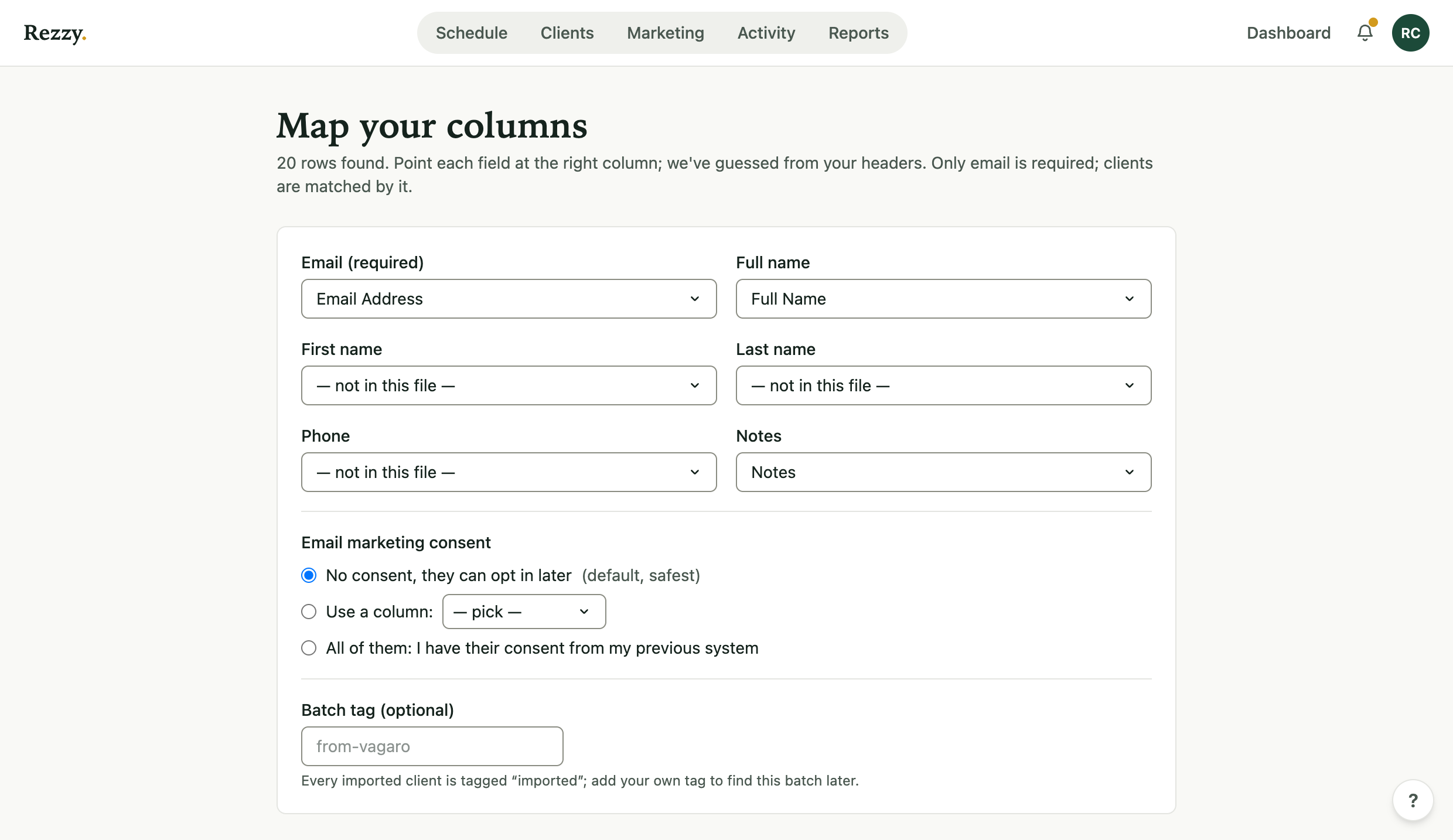 Every import tool has a mapping screen like this. This one is Rezzy’s: point each column at a field and the list comes over intact.
Do not close the account while it still owes you money
The client list is the fear everyone names. The money is the one that actually strands people.
Every platform that processes your payments pays out on a delay, and owners report that the delay gets longer at exactly the moment they say they are leaving. On review sites, studio owners describe waiting ten or more business days for money from services they had already performed, and some report a final payout that never arrived at all. One owner ran two booking systems side by side for a week and a half, not because she wanted to, but because she could not close an account that was still holding her takings.
So do it in this order. Stop taking new bookings on the old app. Let the last payout land in your bank. Check the amount against your own record of what you were owed, line by line. Only then cancel.
If you want to overlap the two systems, overlap them. Running both for two weeks costs one extra month of a subscription and removes the only irreversible risk in the whole move.
Two more things to check on the way out, because both surprise people:
- Look for an exit charge before you click cancel. Owners report being billed on cancellation for hardware that was described as free, in one case a $140 card reader fee that appeared on the final invoice. If you were given a reader, find out what happens to it.
- Remove your card, and confirm it is gone. At least one owner cancelled and then could not delete her debit card from the platform. Cancel the subscription, delete the payment method, and take a screenshot of the account showing no card on file.
This is also the part worth asking about the software you are moving to. In Rezzy, client payments go directly into your own Stripe or Square account, so we never hold your money and could not delay a payout if we wanted to. That is not a policy we could change later. It is just where the money goes. Set it up once in take deposits or full payment and the money is yours from the first booking.
What to do when there is no export button
If your platform has no self-serve export, put the request in writing and be specific: your full client list including names, email addresses, phone numbers, and appointment history, in CSV or Excel. Give a date you need it by. Keep the thread.
Most companies comply, because most companies know the data is yours. If yours does not, you have your answer about whether to stay, and you have it in writing.
There is a slower fallback that always works: your own calendar and your own inbox. Every confirmation email you have ever received carries a name and an address. It is tedious and it is not complete, but it means no platform can ever hold your business hostage, only inconvenience you. Worth knowing before you need it.