TL;DR: To fill empty appointment slots in a slow week, email only the clients who are overdue for their next visit, name the open times, and give one booking link. To a client who is due, that email is a reminder; sent to your whole list, it tells your regulars your book is empty.
It is Monday morning, and Thursday has three holes in it: 11:00, 1:30 and 4:00. You start typing “Last-minute openings this week!” to everyone, then stop. You can already picture the client who was in on Saturday reading it.
That instinct is right. The email works, but only for part of your list.
Who should get the email when you have empty appointment slots?
The clients past their usual cycle with nothing booked. Nobody else. The same email lands differently on each part of your list:
| Who she is | What “Thursday is open” means to her | Send? |
|---|---|---|
| Already booked in the next few weeks | “I could move mine earlier” | No |
| In recently, inside her normal cycle | “They must be quiet this week” | No |
| Past her normal cycle, nothing booked | “Oh, I’m due” | Yes |
The first group is the costly mistake. If the client booked for Saturday moves to Thursday, you did not fill a slot. You moved one.
The third group needed to book anyway, and you handed her a time.
Clients gone six months or more are on the due list too. This email works for them, but the win-back email, which leads with news, works better.
How do you find the clients who are due?
By hand, sort your client list by last visit, start one cycle back, and cross off anyone with a future booking.
In Rezzy, go to Clients and switch the dropdown to Needs rebooking. It lists every client whose last completed visit is older than your rebooking window and who has nothing upcoming. A visit counts only once someone chooses Mark as completed on the booking, so mark each visit after it ends. Set the window to your real cycle under Lapsed after (weeks) in Settings → Booking page; the default is 6 weeks (the full walkthrough).
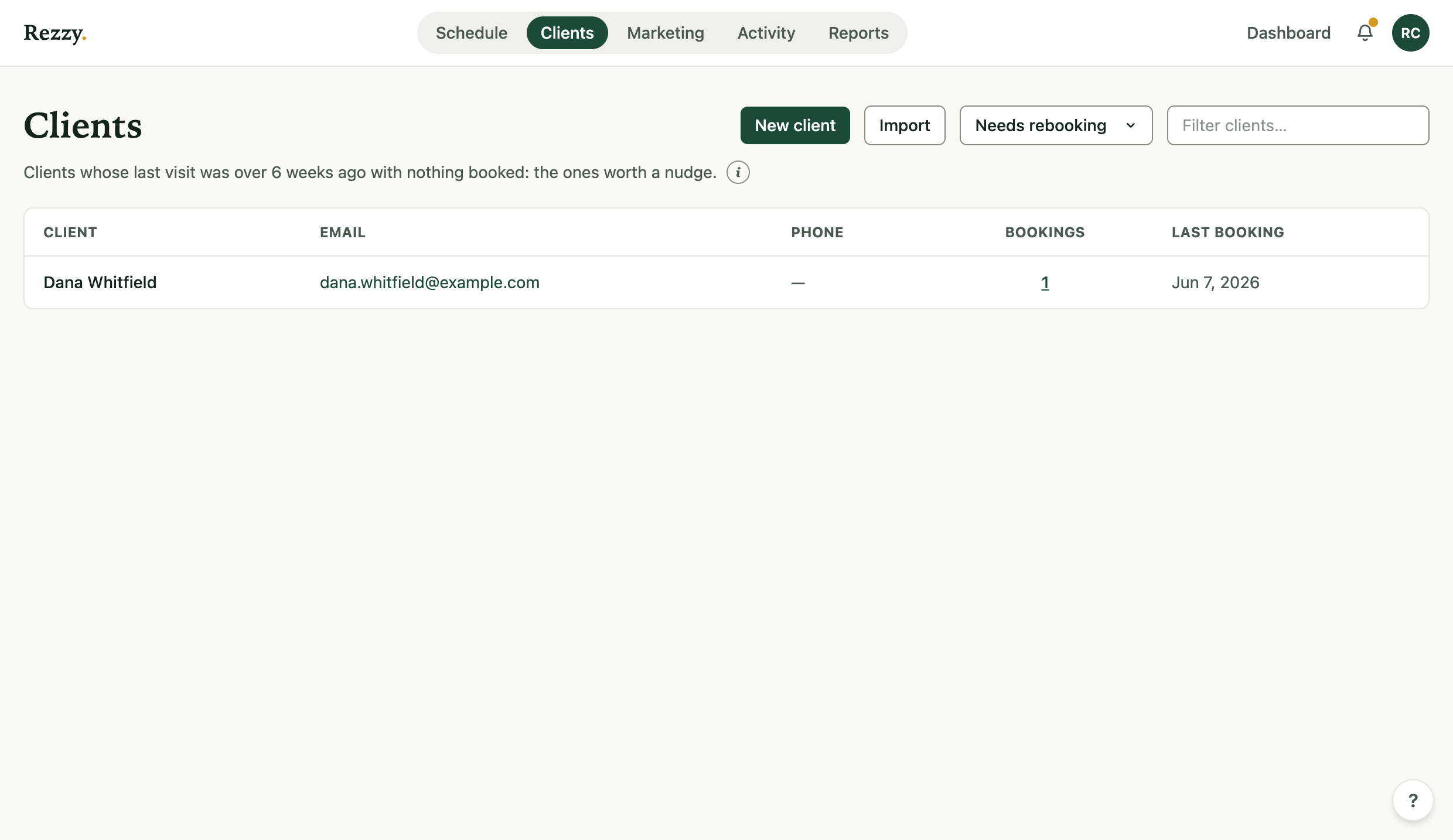
The due list. These are the people who get Thursday.
Read the names before you send. A regular you know well may deserve a text from your own phone first; the rebooking text templates cover that version.
The slow-week email (copy and paste)
Subject: Thursday has openings at [Studio]
Hi [First name],
You’re due for your next [service], and I have a few open times this week: Thursday at 11:00, 1:30 or 4:00.
If one of those works, it’s yours: [booking link]
If this week is busy, the same link shows my later open times too.
[Your name], [Studio], [studio address or P.O. box]
What it does on purpose:
- It opens with her, not with your week. “You’re due” is about her calendar. “We’re quiet” is about yours.
- It names real times. “Some availability” sends her off to look.
- It has no discount. A slow-week discount teaches clients that waiting pays, and the regulars who booked at full price notice.
- One link that works past this week. If Thursday is wrong, she books next Tuesday. She is still back on her rhythm.
Want the due list kept for you? Rezzy builds it from the visits you mark completed, so Monday’s list is waiting before you open the door. Take a booking today.
When should you send a slow-week email?
- Two or three days before the gap. Monday or Tuesday for a Thursday hole. An email at 9:00 for an 11:00 slot asks too much.
- Only when the week is actually thin. Sent every Monday, it stops being news and becomes a newsletter.
- Once. If she does not book, leave it. She stays on the due list for next time.
What the law requires in a slow-week email
The slow-week email sells appointments, so in the US it is a commercial email under CAN-SPAM. The FTC says the law “doesn’t apply just to bulk email,” so a note to five clients counts. Among its rules:
- The subject line must not be deceptive. “Thursday has openings” has to be true.
- The email must explain how to opt out of future marketing email, and you must honor an opt-out within 10 business days.
- The email must include your valid physical postal address. A P.O. box registered with the Postal Service counts.
- The email must say clearly that it is an ad, unless the client agreed in advance to get it.
Checked October 5, 2026 against the FTC’s compliance guide and the text of the law. The links are the source of truth.
In Rezzy, a campaign goes only to clients with Has agreed to receive marketing emails switched on, never to archived clients. An email address on file is not a yes. Every campaign email carries an unsubscribe link, and a client who uses it leaves every future audience at once. Add your postal address under Settings → Business, and every marketing email ends with your studio’s name and that address. With no address on file, Rezzy still sends, and shows a note on the Emails page and the campaign page until you add one (how marketing consent works).
Sending from your own inbox? Then the opt-out line, the address and the record of who said yes are yours.
Send it from Rezzy
- Go to Marketing → Emails → Campaigns and choose New campaign.
- Paste the email. Insert variable adds
{{first_name}},{{service}}(the service from her last completed visit) and{{booking_link}}. Give the link a paragraph of its own and it becomes a Book your next visit button. Type the open times yourself, and leave off the address line: Rezzy adds it. - Under Who gets it, pick Clients due back. The form starts on Everyone with marketing consent, so do not skip this step. The count under it is your Needs rebooking list, minus anyone without marketing consent.
- Leave Skip anyone emailed in the last 7 days on (7 is the default spacing). It skips a client who just got an autopilot email or another campaign.
- Save draft, then Send a test to myself and read it on your phone.
- Send now, or pick a date and Schedule. A scheduled campaign goes out at the Send at hour on Marketing → Emails.
Rezzy works out the audience again when it sends, so a client who books in between, such as the regular you texted, does not get it. Campaigns are part of the Unlimited plan (send a campaign). On Solo and Studio, use the same Needs rebooking list and send one client at a time with Actions ▾ → Send email on her page (email a client). The consent rule is the same.
How to tell if it worked
Open the sent campaign. Its page shows Sent, Clicked, Booked in a week and Skipped, and lists every recipient by name.
Booked in a week counts the clients who booked within seven days of getting the email, whatever date the visit is for. If Thursday stays open but two due clients booked for the week after, the email worked: two regulars are back on their rhythm.
Then shorten the next list at the chair. Before a client stands up, book her next visit. A client who leaves with a date never lands on the due list, and never needs this email.